Your home doesn’t need dozens of expensive gadgets to become smarter. In fact, some of the most useful upgrades are the ones you barely notice—until something goes wrong.
A water leak detector can alert you to a problem before it causes extensive damage. A smart thermostat can help manage heating and cooling costs. A video doorbell lets you see who’s at your door, even when you’re away.
These devices aren’t just about convenience. The right combination can help protect your property, improve everyday safety, and give you more control over household expenses.
If you’re wondering where to start, here are five smart home upgrades worth considering for an ordinary American household.
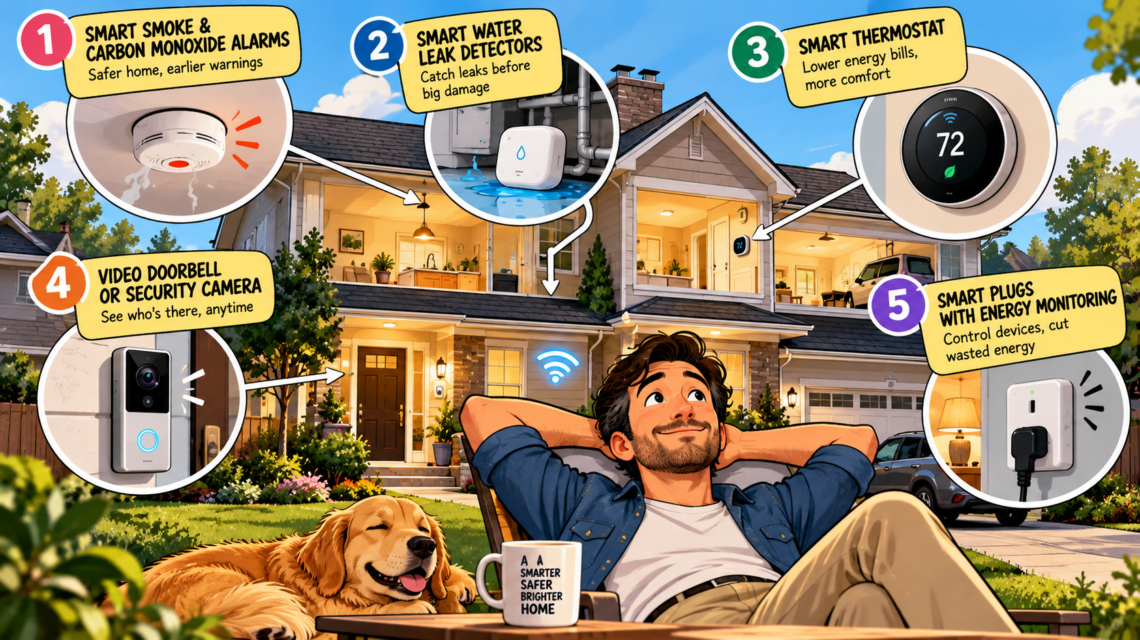
1. Smart Smoke and Carbon Monoxide Alarms
Best for: Home safety and early warnings
Fire and carbon monoxide hazards are among the most important risks to prepare for at home. Smart smoke and carbon monoxide alarms can provide alerts when you’re away from home or send notifications to connected devices, depending on the model.
Some systems also allow compatible alarms to communicate with one another, so an alarm in one area can alert people elsewhere in the house.
Carbon monoxide is particularly dangerous because it is invisible and odorless. A working alarm provides an important warning that you might otherwise miss.
What to look for
- Smoke and carbon monoxide detection, either in separate units or a compatible combination alarm.
- Battery backup or a suitable battery-powered design.
- Interconnected alarms where appropriate.
- Smartphone notifications and clear low-battery warnings.
- Compliance with relevant safety standards.
Worth knowing: Smart features are optional; functioning alarms are essential. The US Consumer Product Safety Commission recommends smoke alarms on every level of the home, outside sleeping areas, and inside each bedroom. CO alarms should be installed on each level and outside sleeping areas. Follow the manufacturer’s placement and replacement instructions. <Cite refs={[“turn273409search4″,”turn273409search7”]}/>
2. Smart Water Leak Detectors
Best for: Preventing expensive home damage
A small leak under a sink or behind a washing machine can go unnoticed for hours or even days. By the time you discover it, water may have damaged flooring, cabinets, drywall, or belongings.
Smart water leak detectors use sensors placed near likely problem areas to identify moisture and send alerts to your phone.
More advanced systems can monitor water flow and automatically shut off the main water supply when they detect a suspected leak.
Where to install them
- Under kitchen and bathroom sinks.
- Near washing machines and dishwashers.
- Beside water heaters.
- Near basement plumbing and sump pumps.
- Around other vulnerable water connections.
What to look for
Choose a detector with reliable alerts, a loud local alarm, and battery monitoring. If you want automatic protection, verify that the system supports a compatible shutoff valve and that installation is appropriate for your plumbing.
Why it matters: A relatively inexpensive sensor may help you discover a leak early, although it cannot prevent every plumbing failure or guarantee that damage will be avoided.
3. An ENERGY STAR Certified Smart Thermostat
Best for: Managing heating and cooling costs
Heating and cooling account for a substantial share of household energy use in the United States. Yet many homes continue heating or cooling empty rooms according to a fixed schedule.
A smart thermostat lets you adjust temperatures remotely and automate settings around your routine. Depending on the model, it may learn your preferences, detect occupancy, or use your phone’s location to adjust temperatures when you leave or return.
ENERGY STAR-certified smart thermostats have demonstrated energy savings using real-world data. The agency estimates average savings of about $50 annually, although results vary with climate, usage, and the home’s heating and cooling system. <Cite refs={[“turn273409search0″,”turn273409search6”]}/>
What to look for
- ENERGY STAR certification.
- Scheduling and remote control.
- Compatibility with your existing HVAC equipment.
- Energy-use reports.
- Occupancy sensors or compatible room sensors.
- Available utility rebates.
Before buying: Check wiring requirements and system compatibility. Some thermostats need a common wire, often called a C-wire, or an adapter. Installation may require professional assistance.
4. A Smart Video Doorbell or Security Camera
Best for: Monitoring deliveries, visitors, and entrances
Packages left outside, unfamiliar visitors, and unexpected activity around your property can create security concerns.
A smart video doorbell lets you see visitors, receive motion alerts, and communicate through your phone. Outdoor security cameras can extend monitoring to driveways, garages, backyards, and other entrances.
Some models offer person detection, night vision, two-way audio, and local storage. Others require a paid subscription to access certain features or retain video recordings.
What to look for
- Clear video quality in daylight and at night.
- Reliable motion detection with adjustable activity zones.
- Two-way audio if you want to communicate with visitors.
- Local recording or a subscription plan that fits your needs.
- Strong account security and regular software updates.
A practical tip: Review recording policies and privacy settings before installation. Position cameras to focus on your property, respect neighbors’ privacy, and secure your account with a strong password and multifactor authentication where available.
A camera can improve visibility, but it is not a substitute for secure doors, appropriate locks, and other basic security measures.
5. Smart Plugs With Energy Monitoring
Best for: Convenience and understanding electricity use
Smart plugs are among the simplest ways to begin building a connected home. Plug a compatible device into one, and you can schedule its power, control it remotely, or integrate it with a supported smart home platform.
Some models also measure electricity consumption, helping you identify how much power compatible appliances use.
For example, you could schedule a lamp to turn on in the evening, automate holiday lighting, or monitor the energy use of a suitable household device.
What to look for
- Energy monitoring if you want usage data.
- Compatibility with your preferred smart home ecosystem.
- Scheduling and remote control.
- Appropriate electrical ratings for the connected device.
- Reliable connectivity and software support.
Important: Smart plugs do not automatically make every appliance energy-efficient. Savings depend on what you connect and how you use it. Never exceed the plug’s rated load, and don’t use an ordinary smart plug for high-power appliances unless the manufacturer explicitly approves that use.
Which Smart Home Upgrade Should You Buy First?
You don’t need to buy everything at once. Prioritize devices based on the risks and expenses most relevant to your home.
| Your main concern | Start with |
|---|---|
| Fire or carbon monoxide safety | Smoke and CO alarms |
| Water damage | Leak detectors |
| High heating and cooling bills | Smart thermostat |
| Deliveries and entryway security | Video doorbell |
| Convenience and electricity monitoring | Smart plugs |
For most homeowners, the sensible approach is to address basic life-safety needs first, then protect against water damage, and finally consider convenience and energy-management upgrades.
Three Things to Check Before Buying Smart Home Devices
1. Compatibility: Check whether the device works with your existing Wi-Fi network, phone, smart home hub, and other equipment.
2. Ongoing costs: Some devices require subscriptions for cloud recording, advanced alerts, or premium features. Check the total cost over several years.
3. Reliability and privacy: Look for regular security updates, secure account access, battery backup where needed, and a plan for what happens if your internet connection goes down.
A smart home should make your life simpler, not leave you managing a dozen apps, subscriptions, and unreliable connections.
Final Verdict
The best smart home upgrades aren’t necessarily the flashiest. They’re the ones that solve a real problem.
Working smoke and carbon monoxide alarms provide essential safety protection. Water leak detectors can help you catch plumbing problems earlier. Smart thermostats can help manage energy use, while video doorbells and smart plugs offer additional convenience and control.
Start with one or two upgrades that address your home’s biggest risks, check compatibility before buying, and expand only when the benefits justify the cost.
The smartest home isn’t the one with the most gadgets. It’s the one that’s safer, easier to manage, and less likely to surprise you with an avoidable expense.
FAQs
1. What is the most useful smart home device to buy first?
Start with functioning smoke and carbon monoxide alarms for essential safety. After that, a water leak detector is a strong option for homeowners concerned about costly plumbing damage.
2. Can smart home devices reduce electricity bills?
Yes, some can help. ENERGY STAR-certified smart thermostats can reduce heating and cooling energy use, while energy-monitoring plugs can help identify consumption patterns. Actual savings depend on usage and the equipment involved.
3. Are smart home devices worth the money?
They can be when the benefits justify the upfront price and any subscription costs. Safety alerts, early leak detection, and automated temperature controls may provide practical value beyond convenience.
4. Do smart home devices work without Wi-Fi?
Some basic functions may continue working locally, but remote alerts and app control often require internet access. Check each device’s offline capabilities before buying.
5. Do I need a smart home hub?